agibot-g2-humanoid-packoff-cell

AgiBot G2 end-of-line packing for flexible, sealed bags

Built by: Rakshith Bangalore Kumaraswamy

Code: Apache-2.0 · non-commercial use only · simulation stage
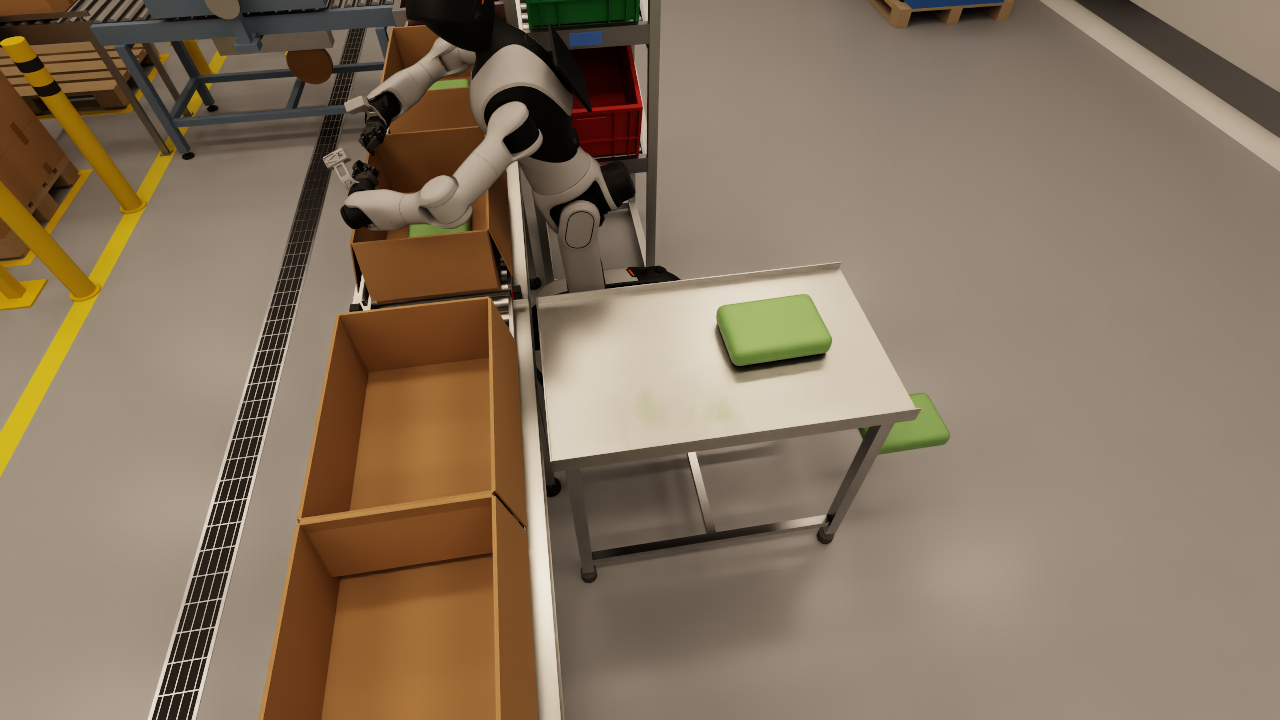
Packing cycle in the U cell. One continuous take, Isaac Sim 6.0.1 through Genie Sim. The G2 drives into the U cell. It picks a bag from the table with the left arm and places it over the open carton on the conveyor. Then it moves the right arm to a tote in the sort rack.
Details
  • The drive-in is 2.0 m in 10.3 s. The final position error is 0.57 cm and 0.00°.
  • The waist turns first: +55° to the table, 0° to the carton, -95° to the rack. Then the arm moves.
  • The base holds its position on odometry while the arms move. The base drift is 0.43 cm and 0.07°.
  • The edit removes the planning time. The clip is 67.8 s at 12 frames per second.
  • This take was recorded before the object pose relay. The bag stays at its start position on camera, and the grasp is symbolic. Refer to the pilot dataset below for a take where the bag moves.

Overview

agibot-g2-humanoid-packoff-cell is a simulated work cell for a humanoid robot at the end of a packing line. The products are flexible, sealed bags, for example bags of salad leaves, bags of crisps and other pillow packs. The robot picks the bags from a table and puts them into cartons on a conveyor. It puts rejected bags into totes in a sort rack.

Pack-off is a manual task in many fresh-produce and snack factories. The cell lets a team develop the robot tasks, collect demonstration data and train policies before a test on a real line.

The reference robot is the AgiBot G2. It has a wheeled base, a waist, two 7-DoF arms with grippers and a head RGB-D camera. The cell runs on AgiBot Genie Sim 3.2 with NVIDIA Isaac Sim 6.0.1. It runs headless in Docker, so it runs on a workstation or on a cloud GPU server.

The bags in the simulation are rigid placeholders at this stage. Deformable bags are a next step. All tests used simulation only. No test on a real robot is complete.

Non-commercial use only. This repository is strictly for non-commercial use. The code is Apache-2.0, but the cell runs only with the AgiBot G2 model and the GenieSimAssets scene assets. These assets have the CC BY-NC-SA 4.0 licence, which does not permit commercial use. Refer to the licence section.

What the cell supports

  • Develop pick, place and sort tasks for a wheeled dual-arm humanoid.
  • Teleoperate the arms from a keyboard over SSH, or with a SpaceMouse.
  • Generate demonstration episodes with a script, with random bag positions.
  • Record synchronised camera, joint and command data, and convert it to HDF5.
  • Train and evaluate imitation-learning policies on the recorded episodes.
  • Test mapping and navigation with the mobile base.

System architecture

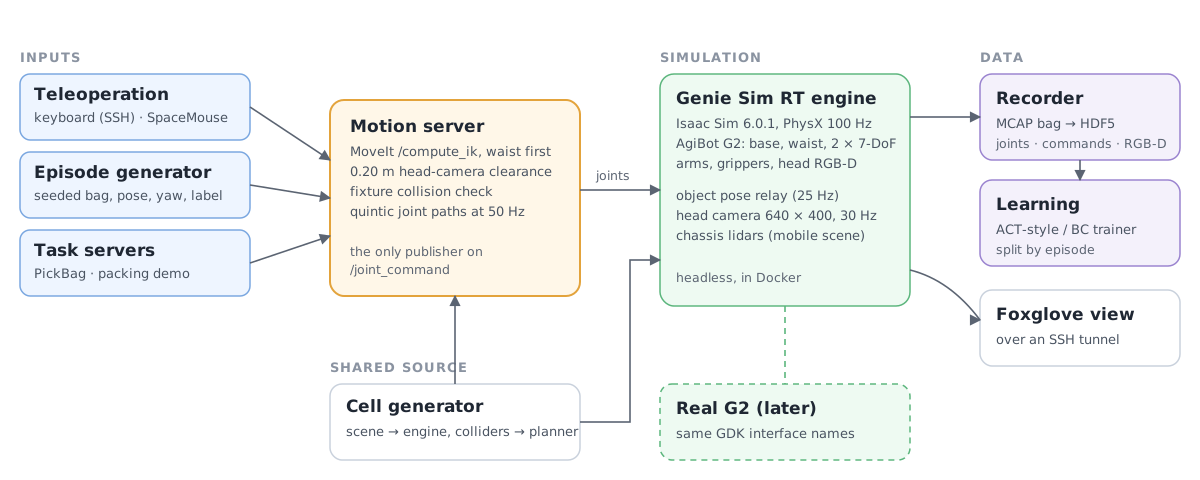
System architecture. Teleoperation, the episode generator and the task servers send requests to the motion server. The motion server is the only node that sends joint commands to the Genie Sim engine. The recorder writes the simulation data to HDF5, and the learning package trains on it.
  • One joint command publisher. All inputs go through the motion server. It solves the arm poses with MoveIt, checks each path against the head camera and the cell fixtures, and sends smooth joint paths at 50 Hz.
  • Robot interface names. A simulated version of the AgiBot GDK interface runs on Genie Sim. 11 of 11 GDK acceptance tests pass against the simulation. Use-case code that uses the GDK names can then run on the real robot with no change.
  • One cell file. One Python generator makes the cell scene and the list of colliders. The planner and the tests use the same list. 199 asset tests check the layout.
Cell

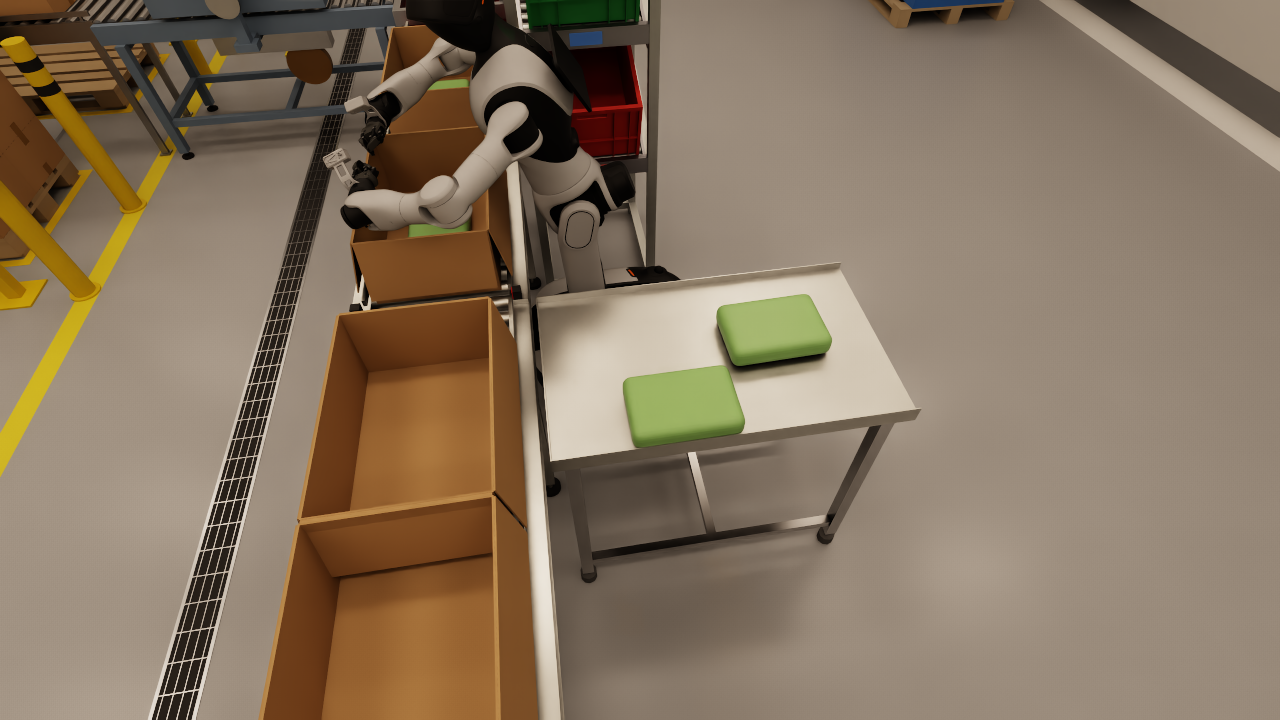
The cell is a U shape. The pick table is on the left, the conveyor is at the front and the sort rack is on the right. The G2 drives into the open side of the U. The clearance is 0.112 m on each side of the chassis.

The line has a case erector, open cartons on the conveyor, a drop gap with a floor bin, a right-angle transfer, a case sealer and a cobot palletiser. The light level at the robot is approximately 1470 lux.

Upstream Genie Sim sends only the robot poses to the renderer. Thus objects that physics moves stay at their start position on camera. The object pose relay adds one hook to the engine. It sends the poses of the bags, cartons and totes to the renderer at 25 Hz. Its cost is approximately 0.05 ms for each physics step.

Close view of the pick table with two green bags, the conveyor with open cartons and the G2
Before. Two bags on the pick table.
The same view after a bag was pushed off the table. The bag is on the floor next to the table.
After. A test pushed one bag off the table. The camera shows it on the floor, where physics put it.

Packing

The packing demo drives the G2 into the cell on odometry. Then it plans each arm move with MoveIt. The waist turns to the work area first, and then the arm moves. While the arms move, the base holds its position. Without this hold, a reach can push the free base by up to 23 cm.

The planner rejects a path if an arm comes nearer than 0.20 m to the head camera, or nearer than 0.015 m to a fixture.

Head camera view. What the robot sees, 640 × 400. This is the head camera of the G2 during the same take. The data recorder and the training use this view.
Details
  • The camera is on the official G2 head mount.
  • The arm paths stay a minimum of 0.20 m from the head camera. The arm colliders of the G2 are off in Genie Sim, so the planner does this check.

Teleoperation and data

The keyboard teleoperation works over SSH. The operator selects an arm and moves its tool in steps of 1 to 50 mm. The node solves the joint positions with MoveIt. The operator can also turn the waist, close the grippers and start or stop a recording. A SpaceMouse gives the same functions.

The recorder writes an MCAP bag. Then it converts the bag to HDF5 with the head RGB and depth frames, the joint states, the joint commands and a group resampled to 30 Hz. The default profile writes approximately 1.1 MB/s, not 78 MB/s for the raw streams.

The episode generator makes demonstrations with a script. It sets a random bag, position and yaw in the reachable area, resets the scene, runs the pick task and records the result.

Recorded teleoperation episode. Kinematic replay from the HDF5 file. An operator moved the arms with the keyboard. The recorder wrote the joint states, the joint commands and the camera frames. This replay draws the robot again from the recorded data.
Details
  • Left: the robot model, with the recorded joint positions.
  • Centre: the head camera and the free camera frames from the episode.
  • Right: the left-arm joints. Grey is measured. Dark blue is the command. The commands and the measured joints agree within 0.0012 rad.
  • This episode is from the first, simpler scene with crates and totes.
  • There is no policy in this clip. It shows the recorded motion only.

Pilot dataset

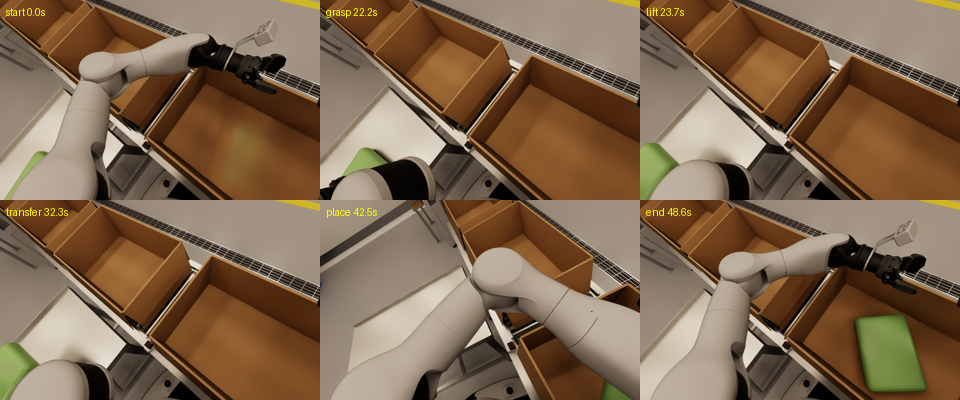
  • 20 of 20 episodes are successful. A scorer reads the bag position after each episode. All 20 bags are in the carton.
  • One episode takes 42.4 s of wall time. Physics stays at 99.7 Hz and the head camera at 30 Hz during data generation.
  • The grasp uses an attach and release at this stage, because a gripper cannot hold the rigid placeholder bag.
Six head camera frames from one pilot episode: start, grasp, lift, transfer, place and end. At the end the green bag is in the carton.

One pilot episode from the head camera: start, grasp, lift, transfer, place and end. At the end, the bag is in the carton.

Training

The learning package converts the HDF5 episodes to a dataset and trains an ACT-style policy or a behaviour cloning policy. The validation split uses complete episodes, so no frame of a validation episode is in the training data.

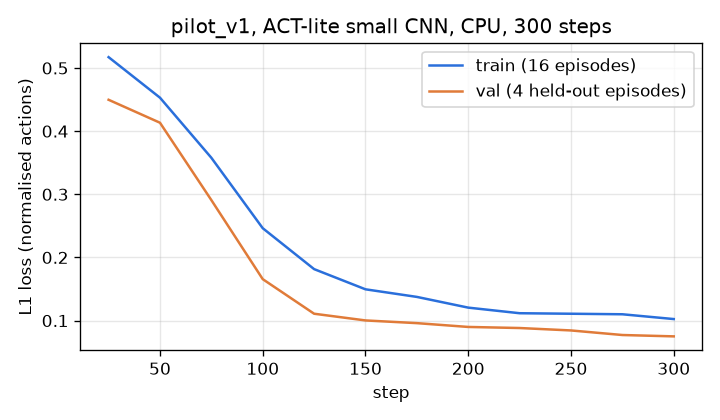
A first test trained a small model on the CPU for 300 steps, with 16 training episodes and 4 validation episodes. The validation loss decreased from 0.45 to 0.075. This test shows that the pipeline works. It is not an evaluation of a policy. Full training runs on a cloud GPU.

L1 loss against training steps for the pilot dataset. The training and validation losses decrease from approximately 0.5 to 0.1 in 300 steps.

L1 loss on normalised actions, pilot dataset, CPU, 300 steps.

Mobility

A mobile version of the scene frees the G2 base and adds two chassis lidars. slam_toolbox makes the map, AMCL finds the robot position, and Nav2 drives the robot.

Mapping and navigation. slam_toolbox makes the map, then Nav2 drives. The mobile G2 drives a scripted loop around the cell. slam_toolbox makes the map from the two chassis lidars. Then Nav2 drives the robot to a goal on the saved map.
Details
  • Part 1: mapping at 4.5 times real time. Part 2: a Nav2 goal at 2.5 times real time.
  • Two of two Nav2 goals succeeded. The final errors are 0.10 m and 0.084 m.
  • The walls on the map are within 0.1 m of the true wall lines: 99% on three walls, 64% on the wall at the map edge.
  • This run used the first cell layout. The map must be made again for the U cell.
  • The lidar mounts are estimates. The official G2 model has no lidar positions. The odometry is ground truth.

Packages

The repository contains the Docker images, the cell assets and these ROS 2 Jazzy packages. Each package has its own README and tests.

PackageContents
g2cell_interfacesMessages, services and actions of the cell (PickBag, MoveArm, CellStatus)
g2cell_motionMotion server: MoveIt IK, head and fixture checks, smooth joint paths, gripper control
g2cell_tasksPickBag server, arm selection from the reach table, cell manager
g2cell_teleopKeyboard and SpaceMouse teleoperation
g2cell_recorderEpisode recorder: MCAP bag to HDF5
g2cell_datagenScripted episode generator with random bag positions and resets
g2cell_learningDataset export, ACT-style and behaviour cloning training, evaluation
g2cell_slamMapping and navigation for the mobile G2
g2cell_gdk_simSimulated AgiBot GDK interface on Genie Sim
g2cell_bringupLaunch files, parameters, stack check and the object pose relay
g2cell_demoPacking demo, drive-in, reach check and camera recorder

Status and next steps

doneGenie Sim and Isaac Sim 6.0.1 headless in Docker, on a workstation and on a cloud GPU server
doneU cell with conveyor, cartons, sort rack and end-of-line machines; drive-in and packing demo
doneObject pose relay: moved objects show at their physics positions on camera
doneKeyboard and SpaceMouse teleoperation, episode recorder, scripted episode generator
donePilot dataset of 20 episodes, 20 successful; training pipeline tested on the CPU
doneSimulated AgiBot GDK interface: 11 of 11 acceptance tests pass
partialReach: 41% of the table spawn area and 1 of 2 rack totes are reachable. Reject bags to the tote need a base turn or a hand-over between arms.
partialMapping and navigation work on the first layout. The map must be made again for the U cell.
nextMoving conveyor with a stop gate, a photo-eye and indexing
nextDeformable bags with three variants, tuned on a test bench
nextA larger dataset and policy training on a cloud GPU
nextPhotorealism and domain randomisation, then tests on a real G2. All results on this page come from simulation only.

Licence

The code has the Apache License 2.0. Copies of this work must keep the NOTICE file.

This repository is strictly for non-commercial use only. The cell needs the AgiBot G2 model and the GenieSimAssets scene assets. The repository does not contain these assets. They have the AgiBot World community licence (CC BY-NC-SA 4.0), which does not permit commercial use. Commercial use needs a separate licence for these assets from their owners.

Acknowledgements

Citation

@software{bangalorekumaraswamy2026packoffcell,
  author = {Bangalore Kumaraswamy, Rakshith},
  title  = {agibot-g2-humanoid-packoff-cell: AgiBot G2 end-of-line packing for flexible, sealed bags},
  year   = {2026},
  url    = {https://github.com/Bkrakshith/agibot-g2-humanoid-packoff-cell},
  license = {Apache-2.0}
}

Disclaimer

agibot-g2-humanoid-packoff-cell is in development. It is research software. All tests used simulation only. No tests on a real robot and no tests of the transfer from simulation to a real robot are complete.

The project is not affiliated with AgiBot or NVIDIA. The names of products and companies on this page identify the software that the project uses. They do not show an endorsement.

The repository is strictly for non-commercial use only, because the third-party assets that it needs do not permit commercial use.

The software is not for the control of a real robot near people, or on a food production line, without a separate safety analysis, tests and approvals by the user.

The author supplies the software, models, data and this page "as is", with no warranty of any kind, express or implied. This includes no warranty of fitness for a purpose, safety, accuracy or non-infringement. Users use the software at their own risk. To the maximum extent that the law permits, the author and the contributors are not liable for any claim, damage, injury, loss or other liability that comes from the software or from its use.