This page shows version 1.0 (archived). Go to the latest version.

WardZero: The Simulated Hospital Where Robots Train Before They Meet Patients

Built by: Rakshith Bangalore Kumaraswamy

Open source (Apache-2.0) · repository: hospital-sim · simulation stage
Hospital and surgical wing. Isaac Sim 6.0 scene, path traced. This scene is the simulation world. It joins the NVIDIA hospital ground floor to a generated surgical wing. The wing has corridors, pre-operative bays, a sterile store, a scrub room and an operating theatre. hospital-sim-env
Details
  • The camera moves on a scripted path. It is not a robot view.
  • Shots: hospital corridor, surgical corridor, two pre-operative bays, sterile store, scrub room and operating theatre.
Assets: NVIDIA Isaac for Healthcare · Lightwheel SimReady · NVIDIA Isaac Sim

Overview

WardZero is an open platform to build and test robot solutions for hospitals. It gives a complete simulated hospital, two simulators, a safety layer and navigation. Users can bring their own robot, controller or task.

The simulated hospital has a surgical wing. The wing has corridors, pre-operative bays, a recovery ward, a sterile store, a scrub room and an operating theatre.

All parts use the low-level interface of the real robot. The controller sends motor targets on /lowcmd at 500 Hz. It reads the joint states on /lowstate. Because of this, the same software runs in MuJoCo, in Isaac Sim and on the real robot.

The reference robot is a Unitree G1 humanoid with 29 degrees of freedom and two BrainCo Revo2 hands. The repositories with the prefix hospital-sim- contain no robot-specific code. A different robot supplies its own model, simulator bindings and controller.

All tests of WardZero used simulation only. No test of the transfer from simulation to a real robot (sim-to-real) is complete yet. WardZero is in development.

What the platform supports

  • Test mapping and navigation in a complete hospital.
  • Train controllers in MuJoCo and test them in Isaac Sim.
  • Develop teleoperation and safety functions.
  • Build and test robot tasks.
  • Record synchronised sensor data with exact ground truth.

System architecture

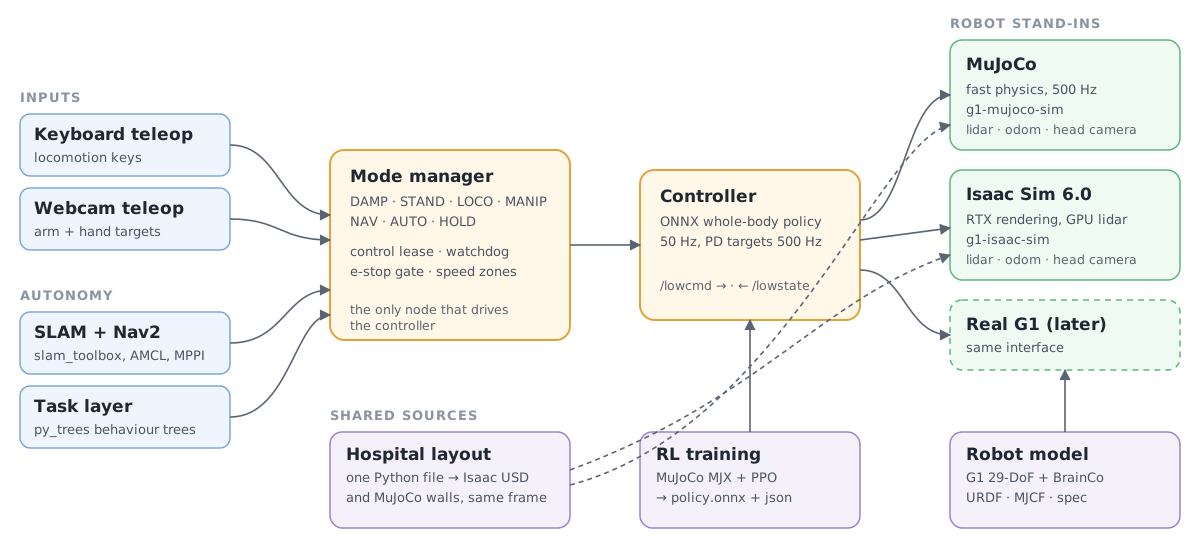
System architecture. The input sources and the autonomy layer send requests to the mode manager. The mode manager drives the controller. The controller sends lowcmd to MuJoCo, Isaac Sim or the real robot, and receives lowstate.
  • One interface. The controller sends /lowcmd and receives /lowstate, as on the real robot. The simulators also publish the lidar scan, the odometry and the head camera.
  • One safety layer. All input sources send requests to the mode manager. The mode manager uses a control lease, a watchdog, an emergency-stop gate and speed zones.
  • One building. One Python layout file defines the hospital. It makes the Isaac scene and the MuJoCo walls in the same world frame. A map from one simulator is correct in the other.
World

The hospital is the NVIDIA Isaac Sim hospital building. A generated surgical wing connects to its south-east door. The wing uses the operating theatre and the props of NVIDIA Isaac for Healthcare and Lightwheel SimReady.

A generator makes the scene from the layout file. A build check stops the build if furniture blocks a door. It also stops the build if two props overlap or if a prop is outside its room. The floor has one level. The corridors are 2 m and 4 m wide. The doors have 2 m of clear width.

The scene uses a reduced copy of the assets, so it can run on an 8 GB graphics card. The light levels are calibrated, so that the white walls do not show as plain white.

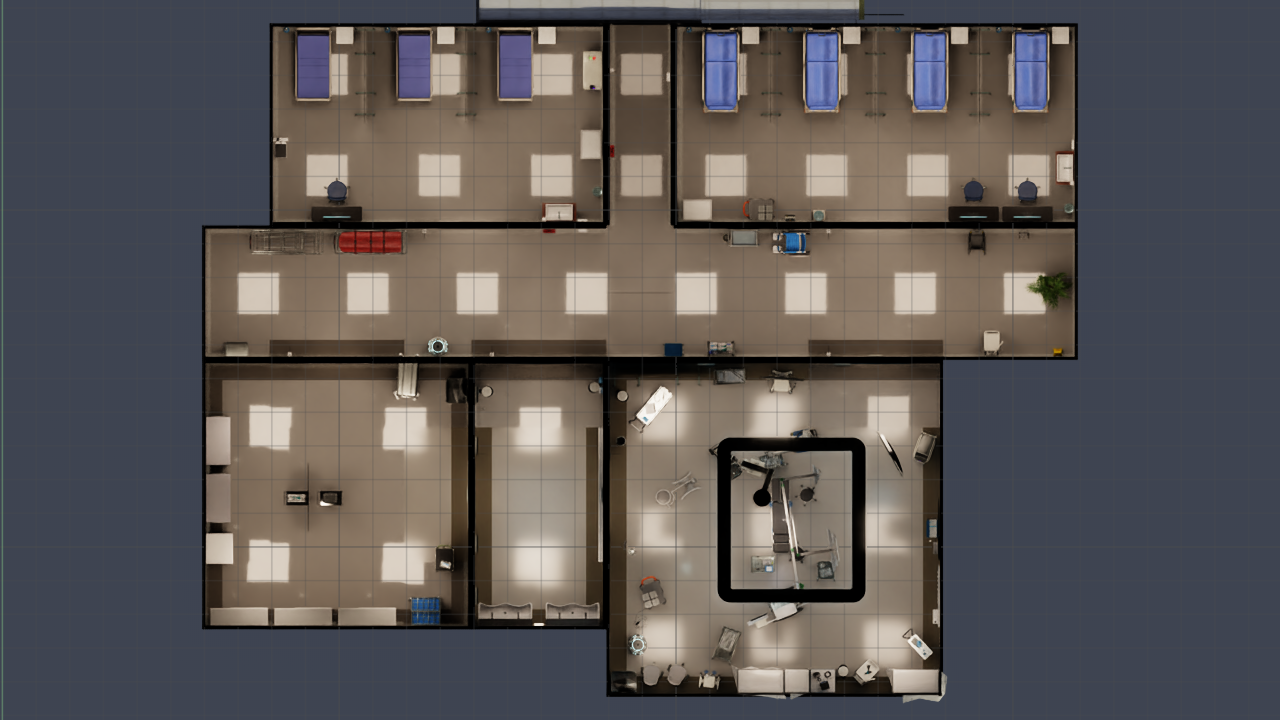
Plan of the surgical wing, seen from above
Plan of the surgical wing. Top row: pre-operative bays, link corridor and recovery ward. Middle: surgical corridor. Bottom row: sterile store, scrub room and operating theatre.
Reference robot: G1 with BrainCo hands. Unitree G1 29-DoF (rev 1.0) with two 6-DoF BrainCo Revo2 hands. One generated model (URDF and MJCF) is the source for the simulators and the ROS 2 nodes. The platform is robot agnostic. A different robot supplies its own model, simulator bindings and controller. g1-brainco-description
Details
  • The clip shows the arm, waist and leg joints. Then it shows a close view of the two hands.
  • The fingers close one by one. Then the thumbs turn and the hands grip. Then the hands open.
  • A script sets the joint positions directly. There is no physics and no controller in this clip.

Simulation for training and test

Two simulators replace the robot. They use the same low-level interface. All the software above the controller is the same in the two simulators.

MuJoCo gives fast physics. The ROS 2 simulator node steps it at 500 Hz, and MuJoCo MJX trains the controller. Isaac Sim gives realistic rendering, a lidar and a head camera. Use it to test navigation and perception with realistic sensor data.

MuJoCo hospital world. Fast-physics version of the same hospital. A generator makes this world from the same layout file as the Isaac scene. The two worlds use the same world frame. The ROS 2 simulator node steps this world at 500 Hz. g1-mujoco-sim
Details
  • Brown: the building and the objects from the Isaac scene. White: the walls of the wing.
  • Blue: the furniture of the wing. Green: the props of the operating theatre.
  • The camera moves over the ground floor and the wing. It stops at the robot in the corridor.
  • The robot does not move in this clip. There is no physics.
  • These are the collision shapes (boxes). They are not the photoreal Isaac scene.
Isaac Sim backend. Same robot interface, realistic sensors. Isaac Sim gives the same low-level interface as the real robot. The controller sends /lowcmd and receives /lowstate at 500 Hz. Isaac Sim also publishes the odometry, the lidar scan and the head camera. The ROS 2 stack runs on it with no change. g1-isaac-sim
Details
  • Left: a third-person view of the run. Isaac Sim renders this view again from the recorded poses, with no new physics.
  • Top right: the head camera frames from the run.
  • Right: the lidar points, seen from above. Forward is up. The rings are 1 m apart.
  • The plot does not show the lidar points on the floor.
  • Bottom: the 12 leg joints from /lowstate. The top band shows the positions. The bottom band shows the torques.
  • The robot walks with a placeholder policy. It moves approximately 1.5 m forward. It moves back a little when it stops.
  • The clip shows simulated time. The run was at approximately 0.4 times real time.
Assets: NVIDIA Isaac for Healthcare · Lightwheel SimReady · NVIDIA Isaac Sim

Controller training

PPO trains the whole-body controller in MuJoCo MJX. 2048 robots train in parallel on one RTX 3070. The curriculum has three stages. Stage A teaches the robot to stand. Stage B teaches it to walk with arm targets. Stage C teaches it to follow full-body motions.

A teacher policy with privileged data trains a student policy. The student uses only the sensors of the real robot. The controller loads the student as an ONNX file. Each stage has gates. The training is not stable, so the trainer keeps the checkpoint that passes the gates.

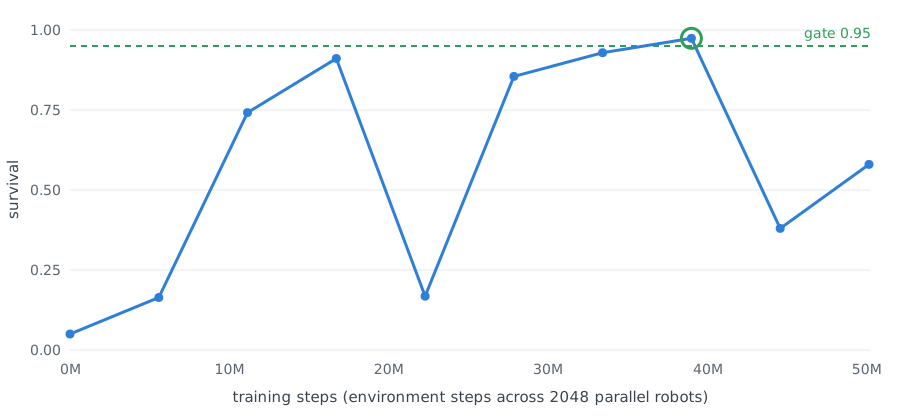
Stage A1 is complete. The survival increased from 0.05 to 0.97 in 39 million steps. The stage took approximately one hour.

Survival against training steps for stage A1. The curve passes the 0.95 gate at 39 million steps.

Survival in stage A1 against training steps. The green ring shows the checkpoint that passed the gate.

Controller training: learn to stand. Stage A1: survival 0.05 → 0.97 in 39 million steps. PPO trains the controller in MuJoCo MJX. 2048 robots train in parallel on one RTX 3070. Stage A1 took approximately 1 hour. g1-whole-body-rl
Details
  • Left: the policy before training. It falls after 1.0 s.
  • Right: the policy after 39 million steps. It stands for the full 11 s test. The maximum tilt is 2.7 degrees.
  • The two policies run in standard MuJoCo. They use the same test as the training gates.
  • Walking (stage B) and motion tracking (stage C) are not trained yet.
Reference policy: ULTRA teacher. Third-party policy on the WardZero robot model. This clip shows the released ULTRA teacher policy on the WardZero G1 model in standard MuJoCo. It is a third-party policy with a non-commercial licence. WardZero uses it only to examine the robot model. g1-whole-body-rl
Details
  • Left: the robot follows a motion clip and moves a box.
  • Right: the robot stays upright through pushes of 200 N.
  • Result on 2026-10-09: approximately 90% of the clips complete. The mean body position error is approximately 5.6 cm.
  • These results are the same as on the original ULTRA robot.

Teleoperation and safety

The mode manager has seven modes: DAMP, STAND, LOCO, MANIP, NAV, AUTO and HOLD. HOLD stops the robot in its position. DAMP removes the power from the motors.

All input sources send requests to the mode manager, and the mode manager makes the decision. A control lease sets which source has control. A watchdog sets HOLD if the interface signal stops. A hardware emergency stop has priority over all inputs. Speed zones on the map set the maximum speed.

Webcam teleoperation controls the arms and the hands. The operator sits in front of a webcam. MediaPipe tracks the operator, and a fork of xr_teleoperate calculates the arm and finger positions. The operator does not need a VR headset.

Mode manager and keyboard teleoperation. One safety layer controls every input. The keyboard sends keys to the mode manager. The mode manager sets the robot mode and sends commands to the controller. In HOLD, it stops the robot and ignores velocity keys. The robot moves again only after an explicit resume. hospital-sim-ros2
Details
  • 0:00 The robot starts in DAMP (motors off).
  • 0:01 Key r: DAMP to STAND. The robot stands up.
  • 0:06 Key l: STAND to LOCO.
  • 0:07 Key w (held): the command is 0.5 m/s. The robot moves at approximately 0.24 m/s.
  • 0:12 Key e: the robot turns right for 2 s. Key q stops the turn.
  • 0:16 Key o: LOCO to HOLD. The velocity command goes to zero.
  • 0:16 The robot makes small steps for approximately 0.2 m. Then it stops.
  • 0:18 Key w: no effect in HOLD.
  • 0:20 Key l: the mode manager rejects it. The operator must resume first.
  • 0:20 Key r: HOLD to STAND (resume).
  • 0:23 Key l: STAND to LOCO. Key w: the robot walks again.
  • 0:28 Space: zero velocity.
  • 0:29 Key p: LOCO to STAND.
  • The robot walks with a placeholder policy. It is slow, and it turns left a little.
  • This is a real ROS 2 run in MuJoCo at 500 Hz. A renderer makes the images again from the recorded joint positions.

Autonomy

Navigation uses standard ROS 2 packages. slam_toolbox makes the map. AMCL finds the position of the robot on the map. Nav2 with the MPPI controller plans the path and drives the robot.

Mapping and navigation. slam_toolbox makes the map while Nav2 drives. The robot moves on a route of 60 points through the hospital and the surgical wing. Nav2 plans each path on the map. slam_toolbox makes this map from the lidar during the walk. hospital-sim-ros2
Details
  • Speed: 750 times simulated time. The clip shows approximately 5.7 h of walking in 27 s.
  • Map accuracy: 99.6% of the wall cells are within 0.10 m of the Isaac ground truth.
  • Map coverage: the map shows 96.6% of the floor that the robot can reach.
  • Map colours: white is free floor, blue is a wall, dark is not seen yet.
  • Overlay colours: cyan is the robot path and magenta is the lidar scan. Green is the Nav2 plan and yellow is the robot.
  • Route points: grey is not visited, yellow is the current goal, green is complete. The robot skipped the red points.
  • Right: the head camera. Isaac Sim rendered these frames after the walk, from the recorded poses.
  • The robot walks with a placeholder policy.
  • The clip comes from the recorded data of the run. It is not a new simulation.
Assets: NVIDIA Isaac for Healthcare · Lightwheel SimReady · NVIDIA Isaac Sim

Repositories

The master repository, hospital-sim, contains the interface contract, the environment script and the list of component repositories. It checks out the component repositories in one folder.

RepositoryContents
hospital-simMaster repository: interface contract, environment script, component list
hospital-sim-envIsaac Sim hospital and surgical wing, layout generator, surgical instruments
g1-brainco-descriptionReference robot model: URDF, MJCF, meshes, robot specification
g1-mujoco-simMuJoCo version of the hospital, made from the same layout
g1-isaac-simRobot in the Isaac hospital: physics layer, lidar, cameras, DDS and ROS 2 bridge
g1-whole-body-rlController training in MuJoCo MJX and ONNX export
hospital-sim-ros2ROS 2 Humble packages: controller, mode manager, teleoperation, simulator node, navigation, tasks, bringup
g1-webcam-teleopWebcam teleoperation of the arms and the hands

Status and next steps

doneHospital and surgical wing in Isaac Sim and MuJoCo, from one layout, in one world frame
doneLow-level interface of the real robot in the two simulators, with lidar, odometry and head camera
doneMode manager with control lease, watchdog, emergency-stop gate and speed zones
doneKeyboard and webcam teleoperation
doneMapping and navigation
partialController: the training of stage A1 (stand) is complete. Distillation, export, walking and motion tracking are next.
nextSimulated patient personas: train human characters that act as patients in the simulated hospital. Researchers can then study robot-human interaction in simulation, before tests with people.
nextData from the simulators to train and test learned world models
nextSim-to-real transfer and tests on a real robot. All the results on this page come from simulation only.

Acknowledgements

Citation

@software{bangalorekumaraswamy2026hospitalsim,
  author  = {Bangalore Kumaraswamy, Rakshith},
  title   = {hospital-sim: Master repository of a humanoid robot stack in a simulated hospital},
  year    = {2026},
  url     = {https://github.com/Bkrakshith/hospital-sim},
  license = {Apache-2.0}
}

Disclaimer

WardZero is in development. It is research software. All tests of WardZero used simulation only. No tests on a real robot and no tests of the transfer from simulation to a real robot are complete.

WardZero is not a medical device. It is not for patient care or for a clinical procedure. It is not for the control of a real robot near people without a separate safety analysis, tests and approvals by the user.

The author supplies the software, models, data and this page "as is", with no warranty of any kind, express or implied. This includes no warranty of fitness for a purpose, safety, accuracy or non-infringement. Users use WardZero at their own risk. Users are responsible for all the work that they do with it.

To the maximum extent that the law permits, Rakshith Bangalore Kumaraswamy and the contributors are not liable for any claim, damage, injury, loss or other liability that comes from WardZero or from its use. This applies to direct, indirect, incidental and consequential damage. Refer also to sections 7 and 8 of the Apache License 2.0.